
What it is (why)
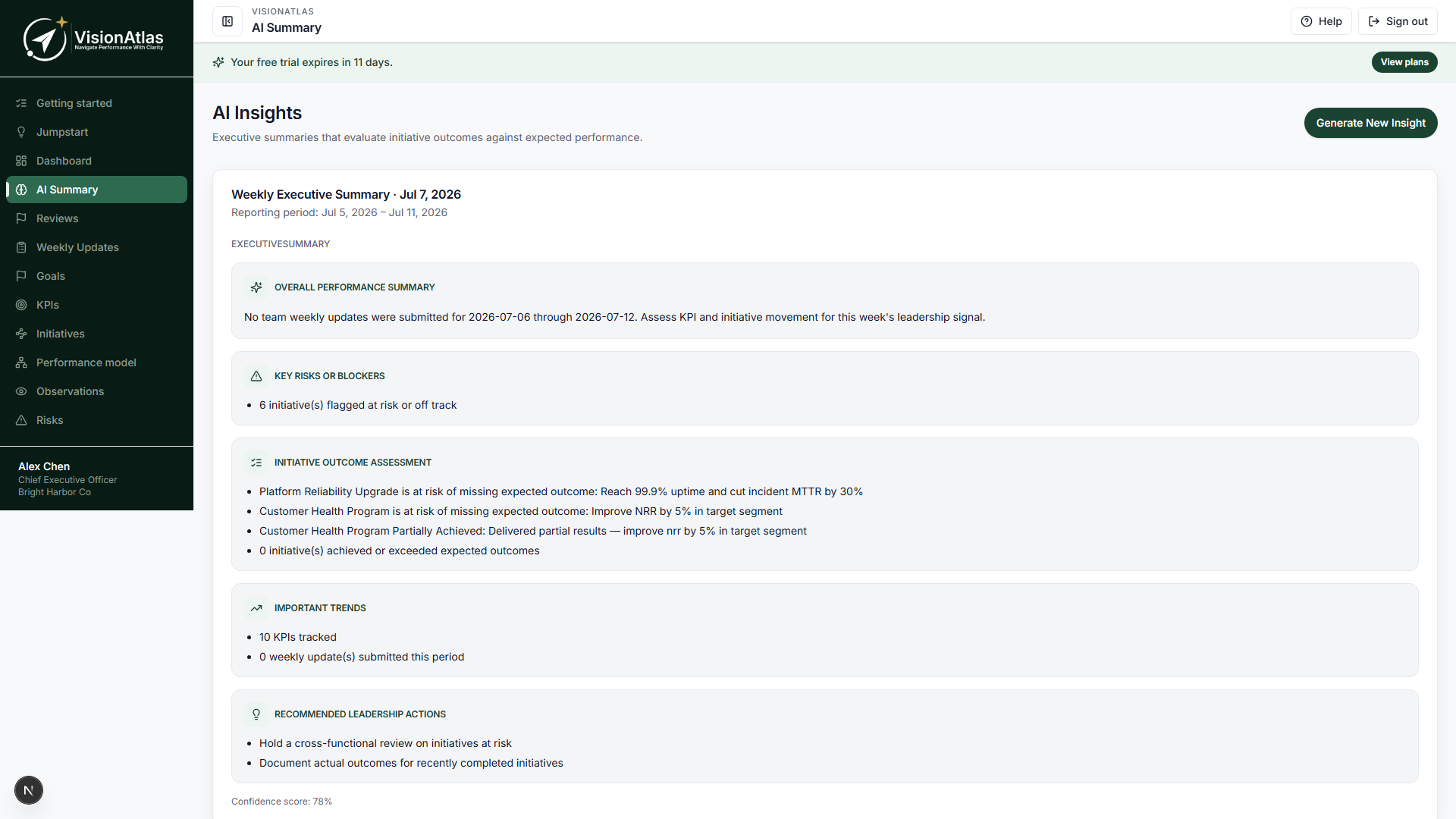
AI Summary (/ai-summary) generates a fresh executive narrative from your current workspace data — goals, KPI health, initiatives, risks, highlights, and recommended actions. Use it when leadership needs a quick read without building a full slide deck.
For a weekly ten-slide product, use Executive Briefings. For archived period records, use Executive reviews.
When to use it
| Need | Use |
|---|---|
| Quick leadership read this week | **AI Summary** → **Generate** |
| Repeatable Monday slide deck | [Executive Briefings](/help/executive-briefings) |
| Monthly/quarterly snapshot on file | [Executive reviews](/help/executive-reviews) |
| Short PowerPoint for board/investors | **Download board pack** (five slides) |
| Theme trends from weekly updates | **Theme detection** (Leadership+ plans) |
Requires Intelligence+ with AI recommendations and CanViewExecutiveDashboard. Data respects entity visibility rules.
How to use it
Generate a summary
- Open AI Summary from the sidebar.
- Click Generate (or Generate insight).
- Read sections: goals, KPIs, initiatives, risks, highlights, and recommended actions.
- Regenerate after major data updates if the narrative feels stale.
The summary uses the current reporting period (typically the active fiscal week).
Previous summaries
The page lists recent ExecutiveSummary insights. Open a prior row to compare narrative over time (useful after large data imports or reorgs).
Theme detection (Leadership+)
When your plan includes theme detection:
- Use Run theme detection on the AI Summary page (or rely on the scheduled cron job).
- Review detected themes linked to weekly updates for the period.
- Themes feed executive context alongside KPI and initiative health.
Turn recommendations into action items
If you have CanCreateActionItems, recommended actions in the summary can be tracked as action items directly from the insight cards — closing the loop after leadership reads the narrative.
Download board pack
Download board pack exports a five-slide PowerPoint (executive summary, KPI health, initiatives, risks, outlook) from current data. Same export is available on Executive reviews.
This is shorter than the ten-slide Executive Briefings PowerPoint export.
Who typically owns it
- Executives — generate and read summaries before meetings
- Managers — keep KPI actuals and weekly updates current so AI output is accurate
- Administrators — enable email/cron for related jobs; theme detection cron on Leadership+
Related
- Executive leadership overview
- Ask — one cited question instead of a full narrative
- Executive Briefings
- Executive reviews
- Dashboard
Common mistakes
- Generating with stale KPI actuals — update integrations or manual values first
- Using AI Summary as the only leadership artifact when the board expects a weekly deck — add Executive Briefings
- Expecting theme detection on Foundation or Intelligence Plus without Leadership plan features
- Confusing board pack (5 slides) with briefing PowerPoint (10 slides)